
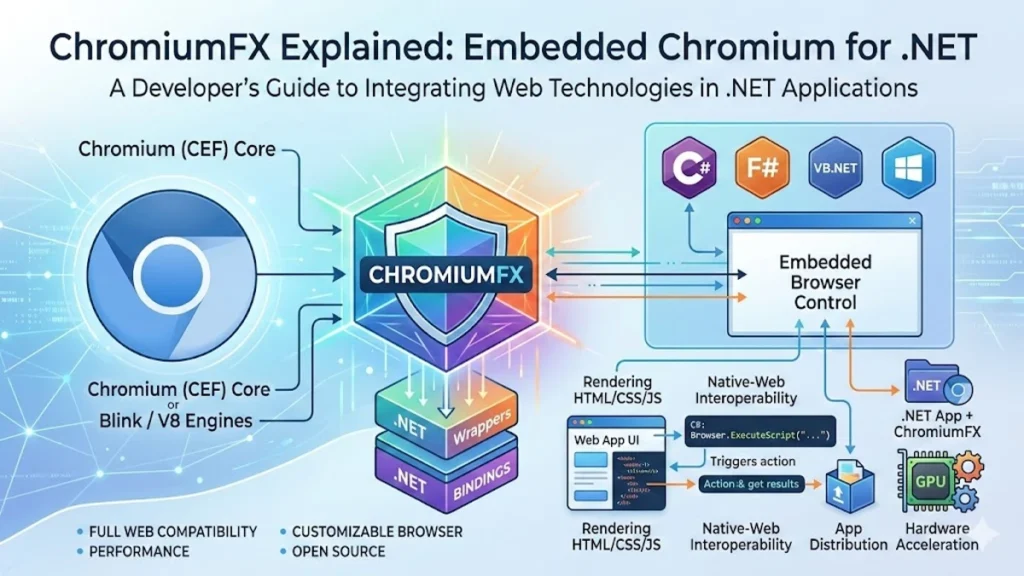

I often see developers searching for ways to combine the power of native desktop software with the flexibility of web technology. ChromiumFX sits at the center of that conversation. It is a framework that enables .NET applications to embed the Chromium browser engine directly into desktop software, allowing programs built with languages such as C# to render web content, execute JavaScript and interact with modern HTML interfaces.
In practical terms, ChromiumFX acts as a bridge between the traditional world of desktop development and the rapidly evolving ecosystem of web applications. Instead of building complex user interfaces entirely with older desktop toolkits, developers can design modern interfaces using HTML, CSS and JavaScript while maintaining the control and performance advantages of native software.
The framework is built on top of the Chromium Embedded Framework, often called CEF, which was introduced to allow the Chromium browser engine to operate inside other software environments. ChromiumFX provides managed .NET bindings around that underlying technology. This makes it possible for developers to integrate browser functionality into desktop applications without writing extensive C++ code.
The result is a development approach that blends two historically separate ecosystems. On one side sits the structured and performance-oriented .NET runtime. On the other sits the powerful web platform powered by the Chromium rendering engine. ChromiumFX allows those two environments to operate together, opening the door to a new class of hybrid desktop applications.
The Origins of ChromiumFX and the Embedded Browser Movement
The emergence of ChromiumFX can be traced back to a broader shift in software development that began in the late 2000s. At that time, the web was evolving rapidly. JavaScript engines were becoming faster, web standards were expanding and browser rendering engines were capable of supporting complex applications that once required native software.
Chromium itself began as an open-source browser project created to provide a foundation for modern web browsers. Over time, its rendering engine and JavaScript engine became some of the most powerful components in modern computing. Developers quickly realized that these capabilities could be used outside traditional web browsers.
That realization led to the creation of the Chromium Embedded Framework. CEF allowed developers to embed the Chromium engine directly into other applications. Instead of launching an external browser window, developers could render web pages inside their own software.
ChromiumFX emerged as one of several efforts to bring that capability to the .NET ecosystem. The framework wrapped the native CEF interfaces and exposed them to developers through managed libraries. This allowed programmers working with C# and other .NET languages to interact with Chromium in a way that felt natural within the .NET programming model.
As hybrid development gained momentum, tools like ChromiumFX became increasingly important. They provided a way for desktop software to adopt the design flexibility and rapid iteration cycle that web development offered.
Understanding the Core Architecture of ChromiumFX
At the heart of ChromiumFX lies a layered architecture that mirrors the design of modern web browsers. The framework does not replace the Chromium engine. Instead, it provides a bridge that allows the engine to function inside a .NET application.
The Chromium engine is responsible for interpreting HTML and CSS, executing JavaScript through the V8 engine and rendering graphical web content on the screen. ChromiumFX exposes this functionality through a set of .NET libraries that communicate with the underlying CEF components.
One of the defining features of this architecture is its multi-process structure. The main application process controls the program’s logic and interface. Separate rendering processes handle web content and script execution.
This separation increases stability. If a rendering process encounters a crash or an unexpected script error, the main application remains running.
Key Architectural Components
| Component | Role in ChromiumFX |
|---|---|
| Chromium Engine | Renders HTML, CSS and JavaScript |
| Chromium Embedded Framework | Provides the core embedding API |
| ChromiumFX Wrapper | Exposes Chromium features to .NET developers |
| Browser Process | Manages application logic and window behavior |
| Renderer Process | Executes web content and JavaScript |
This structure allows developers to access the capabilities of the Chromium engine while maintaining the stability expected from enterprise desktop software.
Integration with the .NET Development Environment
ChromiumFX was designed specifically with .NET developers in mind. Instead of forcing developers to work directly with native code, the framework provides managed classes that behave like other .NET components.
Developers can embed a Chromium browser control inside Windows Forms or Windows Presentation Foundation applications. Once integrated, the browser component behaves like a built-in interface element.
From there, developers gain access to several capabilities. Applications can load web pages, execute JavaScript commands, manipulate the Document Object Model and exchange data between the browser and the application.
This integration simplifies development workflows. Web developers can design the interface using familiar technologies while backend developers implement application logic using C# or other .NET languages.
Software architect Martin Fowler once observed that modern applications increasingly blend web and native technologies because web interfaces offer flexibility and rapid design iteration. ChromiumFX represents a practical example of that trend.
The Rise of Hybrid Desktop Applications
Over the past decade, hybrid applications have become increasingly common in both enterprise and consumer software. These applications combine native system capabilities with web-based user interfaces.
ChromiumFX plays an important role in enabling this architecture. By embedding a browser engine inside desktop software, it allows developers to create applications that look and behave like modern web apps while retaining access to local system resources.
This approach offers several advantages. Web technologies such as HTML, CSS and JavaScript are widely understood by developers. That means teams can build interfaces faster and maintain them more easily.
Another advantage is cross-platform flexibility. Although ChromiumFX primarily targets .NET environments, the design philosophy behind hybrid development encourages reusable interface components that can work across multiple platforms.
Technology analysts often describe this trend as the convergence of desktop and web software. As browser engines become more powerful, they increasingly function as universal interface platforms.
Common Use Cases for ChromiumFX
ChromiumFX has been used in a variety of software categories where web functionality must coexist with native desktop features.
Organizations often adopt the framework when building internal business tools that require both graphical dashboards and local system integration. Instead of launching a browser window, the dashboard becomes part of the application interface.
Typical Applications
| Application Type | Description |
|---|---|
| Enterprise dashboards | Monitoring tools displaying real-time data |
| Software launchers | Interfaces that update or launch applications |
| Hybrid productivity apps | Desktop software with web-based interfaces |
| Automation tools | Applications interacting with web services |
| Internal management systems | Business tools using browser-based UI |
Game launchers, enterprise analytics platforms and internal company tools frequently use embedded browsers to deliver dynamic user interfaces.
By embedding the browser engine, developers can update the interface quickly using web technologies without rebuilding the entire desktop application.
Performance and Technical Advantages
ChromiumFX inherits the performance advantages of the Chromium browser engine. Chromium’s rendering pipeline has been optimized for modern web applications, allowing it to process complex JavaScript frameworks and dynamic user interfaces.
Because the engine runs within a dedicated rendering process, intensive web operations rarely block the main application thread. This design ensures smoother performance, particularly when dealing with data-heavy interfaces.
Another important feature is off-screen rendering. This capability allows applications to render web content without displaying a visible browser window. Developers often use this technique in automation tools, testing environments and applications that generate visual output programmatically.
The framework also allows developers to interact directly with the V8 JavaScript engine. Through the communication bridge between processes, .NET code can call JavaScript functions and retrieve results.
These capabilities make ChromiumFX a powerful option for developers building sophisticated hybrid applications.
Limitations and Challenges
Despite its strengths, ChromiumFX presents certain challenges that developers must consider.
One issue involves maintaining compatibility with the rapidly evolving Chromium codebase. Chromium releases frequent updates, and frameworks built on top of it must adapt to keep pace with security patches and new features.
Another concern is application size. Because ChromiumFX embeds a full browser engine, applications using the framework can become significantly larger than traditional desktop programs.
Security considerations also play an important role. When applications load external web content, developers must ensure proper sandboxing and validation to prevent malicious scripts from affecting the host system.
Over time, some developers have chosen alternative frameworks that provide more active maintenance or official vendor support. However, ChromiumFX still serves as a useful solution for developers who need direct access to CEF capabilities within a .NET environment.
ChromiumFX Compared with Other Frameworks
Several frameworks provide similar functionality, each with its own strengths and trade-offs.
| Framework | Primary Environment | Key Strength |
|---|---|---|
| ChromiumFX | .NET | Deep integration with CEF and .NET |
| CefSharp | .NET | Large developer community |
| Electron | JavaScript | Cross-platform desktop apps |
| WebView2 | .NET | Official Microsoft support |
Electron has gained popularity for cross-platform applications because it bundles the Chromium engine with Node.js. WebView2, developed by Microsoft, uses the Edge browser engine and integrates closely with Windows development tools.
ChromiumFX remains a specialized solution for developers who want direct access to CEF within the .NET ecosystem.
Expert Perspectives on Embedded Browsers
The growing popularity of embedded browser frameworks reflects a larger transformation in software development.
Software architects increasingly view web technologies as a universal interface layer. HTML and JavaScript allow developers to build interfaces quickly while supporting rich visual experiences.
Industry analysts have noted that browser engines have evolved into powerful runtime environments capable of supporting complex applications. This shift has encouraged developers to bring web technologies into traditional software environments.
ChromiumFX is one example of how this transformation has unfolded. By combining the Chromium rendering engine with the .NET runtime, the framework illustrates how modern software architecture blends once-separate technologies into unified development platforms.
The Future of ChromiumFX
The long-term future of ChromiumFX depends on the direction of desktop development and the evolution of embedded browser technology.
Large technology companies continue to invest heavily in browser engines and hybrid frameworks. As these tools mature, developers gain more options for integrating web technologies into desktop applications.
While some frameworks receive stronger corporate backing, niche tools like ChromiumFX still play a role in specialized development environments. Developers who rely heavily on CEF may continue to use it for projects requiring granular control over browser behavior.
The broader trend remains clear. Web technologies are increasingly shaping how software interfaces are built, even when the final product is a desktop application.
ChromiumFX represents an early but significant step in that ongoing transformation.
Key Takeaways
• ChromiumFX allows .NET applications to embed the Chromium browser engine directly inside desktop software
• The framework is built on top of the Chromium Embedded Framework
• It enables hybrid desktop applications that combine native functionality with web interfaces
• The architecture relies on a multi-process model separating application logic and web rendering
• Developers can interact with web content using C# and JavaScript together
• Alternatives such as CefSharp, Electron and WebView2 offer similar capabilities
• Embedded browser frameworks reflect the growing convergence of web and desktop development
Conclusion
When I look at the evolution of desktop software, frameworks like ChromiumFX stand out as an important milestone in the blending of web and native technologies. They reveal how dramatically the software landscape has changed over the past decade.
ChromiumFX demonstrates that the browser engine is no longer limited to browsing the internet. Instead, it has become a powerful component that developers can embed directly into applications. This shift allows teams to create modern user interfaces while still benefiting from the stability and performance of native software.
The framework also highlights the growing influence of web standards across the entire software industry. HTML, CSS and JavaScript have become universal building blocks for user interfaces, regardless of whether an application runs in a browser or on a desktop.
Although newer frameworks continue to emerge, the core idea behind ChromiumFX remains relevant. As software development evolves, the line between web applications and desktop programs continues to blur. Tools that connect these worlds will remain an important part of the developer ecosystem.
Click Here to Read More Interesting Blogs!
FAQs
What is ChromiumFX used for
ChromiumFX is used to embed the Chromium browser engine inside .NET desktop applications. It allows developers to display web content, run JavaScript and build hybrid interfaces using modern web technologies.
Is ChromiumFX open source
Yes. ChromiumFX is an open-source framework that provides .NET bindings for the Chromium Embedded Framework.
How does ChromiumFX differ from CefSharp
Both frameworks wrap the Chromium Embedded Framework for .NET developers. CefSharp is generally more actively maintained and has a larger developer community.
Can ChromiumFX run on multiple platforms
ChromiumFX primarily targets Windows environments within the .NET ecosystem because it was designed for desktop applications built with .NET technologies.
Why do developers use embedded browser frameworks
Embedded browser frameworks allow developers to use web technologies for application interfaces while maintaining the performance and system access of native software.